What’s New in Rollie - October 19, 2026
We've shipped a steady stream of updates since our last release notes. Most of them land on your job board, so that's where we'll start.
Job Board Enhancements
Last month we introduced a JavaScript embed alongside the iframe. This round makes it the full board and gives you more control over what your board shows.
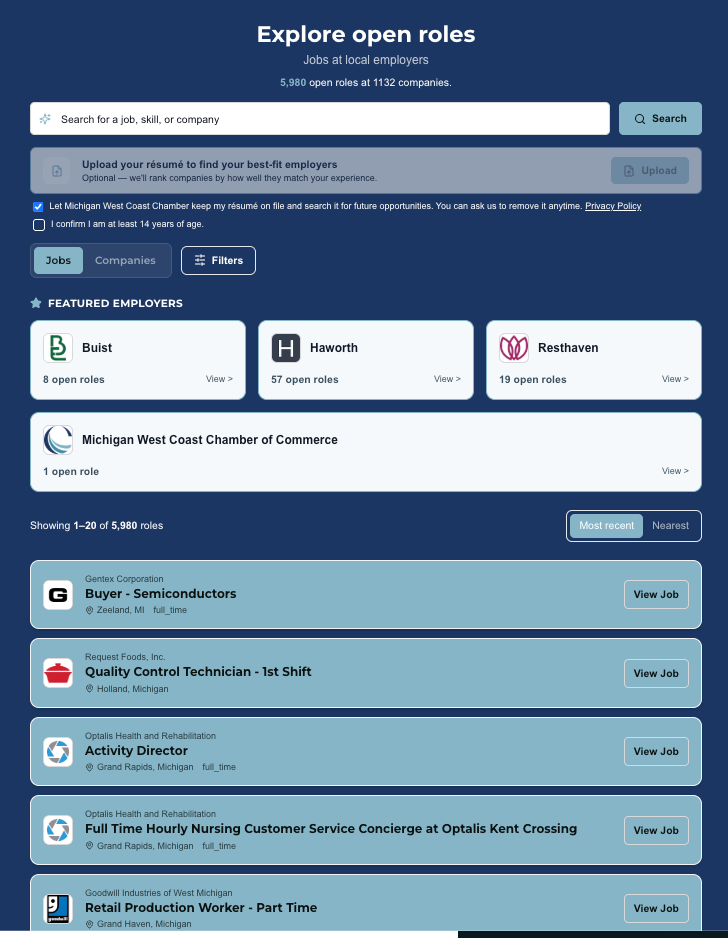
The Full Board, Embedded - The JavaScript embed now renders your complete Rollie board directly in your page: the Jobs tab, the Companies tab, search, filters, and company profiles. Every job and company is a real link that search engines can crawl, so the SEO value of those listings stays on your site. The embedded board matches your live board exactly, with the same jobs, order, page size, and styling. If you're already using the JavaScript snippet, you don't need to change anything. It upgrades on its own.
Hide Companies by Tag - Boards can now hide companies that carry a particular tag. Set it under Hide companies tagged in your board settings. It's a simple way to keep a member-only board free of non-members, or to run a board just for one industry or program.
Apply Click Tracking - When a job seeker clicks Apply on your board, the link now carries tracking tags that identify Rollie and your organization. That means employers can open Google Analytics and see exactly where their applicants are coming from. Traffic from your board shows up by name instead of getting lumped in as an anonymous direct visit. It's a clear, concrete way to show your members the value of being on your board.
Accessibility Check - The style editor now checks your color choices for contrast and flags any combination that's hard to read, so your board stays accessible to everyone.
Smaller Fixes - The Jobs tab now honors your Jobs per page setting. Paging through jobs or companies scrolls you back to the top of the list. Jobs that link to a company page instead of a specific posting now say "View on company page." A shared job that's no longer open now says so.
Company Reporting
Your board does real work for the employers on it. Now you can show them.
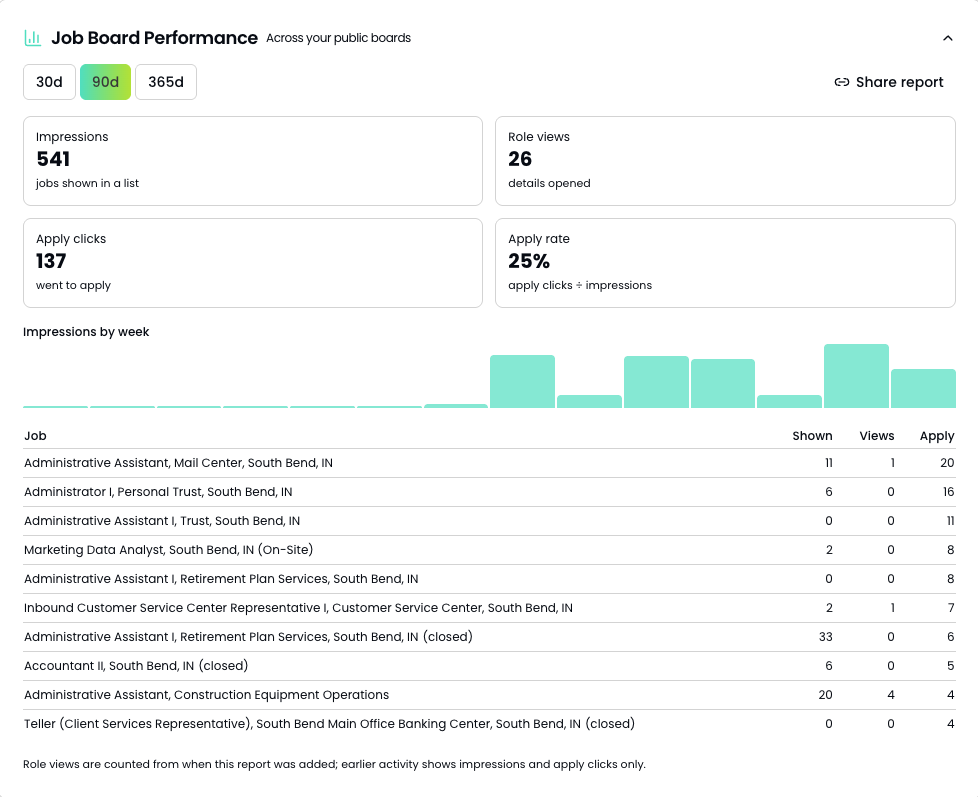
Job Board Performance - Each company page now has a Job Board Performance card showing how many times people viewed that company's jobs on your board and how many clicked Apply.
Shareable Company Reports - From that same card, you can create a report link and send it to the employer. They'll see their own numbers on a clean public page, with no login required. It's a ready-made reason to reach out to a member, and a great way to make the case for your board at renewal time.
Tagging in Place - You can now tag a company directly from your companies list or the company page, and tags now appear on the list where you can see them at a glance.
Manual Jobs Count - Jobs you post manually now count toward a company's open roles on your board's Companies tab. Before, a company with only manually posted jobs could show zero open roles, or drop off the Companies tab entirely.
Easier Editing
Rich Text Editing - Manual job descriptions and company profile fields now have a full text editor, with bold, lists, and links. Requirements and benefits get their own bullet-list editors.
Manual Job Fixes - Editing a manual job no longer fails with an error, and application deadlines no longer display a day early.
Team Invitations
Pending invitations on the Team page now show whether the invite email was delivered, and that status updates live. No more guessing whether a new teammate ever got the email.
Resume Updates
Age Confirmation - When a job seeker uploads a resume that your organization will keep, they now confirm they're 14 or older. That confirmation is recorded with the upload.
Retention Default - If your board lets each visitor decide whether to leave their resume with you, you now choose whether that checkbox starts checked or unchecked.
Job Seeker Enhancements
For organizations using the Job Seekers module, this round adds a good deal.
Resume to Job Seeker - Turn any retained resume into a job seeker with one click from Resume Captures, or switch on a board setting that does it automatically, matching on email so you don't get duplicates. Admins get a daily email listing the new seekers.
Hot Jobs - Staff can flag a job as hot for a specific seeker and add a note. It shows up on that seeker's shareable link.
Resources Page - Build an organization-wide resources page under Job Seekers, and it appears as a tab on every seeker's shareable link.
Job Seeker Analytics - A new analytics dashboard under Job Seekers tracks your caseload and outcomes. Mark any status as Counts as placement so placements are counted automatically.
See It in Action
The best way to see any of this is to log in and look around. Check out the embed on your site, pull up a company's Job Board Performance card, or send an employer their first report.
And if you have questions about anything here, just reach out to info@rolliejobs.com. We're always glad to hear from you.